Onyro

Free couch game launcher for Windows

Onyro

Your PC games, from the sofa.

Every game you've installed from Steam, Xbox, Epic, GOG, EA, Ubisoft, Battle.net, Rockstar, Riot and itch.io, on one shelf you drive with a controller. Games launch through the launchers you already use. Onyro does not sell games.

0.2.9-beta. Free. Updates come from the Microsoft Store.

Get Onyro free
Favourites. Games already on this PC.

Windows 10 21H2 or later. 4 GB RAM. DirectX 11. A controller is recommended.

Every launcher. One shelf.

Works with the launchers you already use

Onyro reads what your launchers have already installed and puts every game on one full-screen shelf. No plug-ins to install, no accounts to link, no setup evening.

  • Steam
  • Xbox app and Microsoft Store, including PC Game Pass
  • Epic Games
  • GOG, with or without GOG Galaxy
  • EA app
  • Ubisoft Connect
  • Battle.net
  • Rockstar Games Launcher
  • Riot Client
  • itch.io
  • Any game folder you add

Games start through their own launcher, so saves, achievements, cloud sync and updates work the way they do today.

Desk once. Sofa after.

The couch loop

  1. Switch on your controller

    Pick the start-up helper on first launch. Once Windows is signed in, switching on a controller opens Onyro, or brings it to the front.

  2. Pick a game, press Play

    Onyro steps aside while you play and ignores your buttons, apart from the 3-second mouse chord. Other launchers are minimised, never closed, so downloads keep running.

  3. Quit, and the shelf is back

    Everything Onyro moved out of the way comes back when the game exits.

  4. Power down from the sofa

    Select opens Power options: exit Onyro, restart or shut down the PC. Each one asks first.

Select + Start, 3 seconds

Leave the keyboard on the desk

Hold Select and Start for three seconds (Create and Options on a PlayStation controller) and the right stick drives the Windows mouse pointer. A or the right trigger clicks, and the left trigger right-clicks. Hold both again to hide it.

Use it on a publisher pop-up, a browser, or any window that ignores the controller. Windows doesn't let apps like Onyro click admin (UAC) prompts, so those still need a mouse.

How the controller mouse works

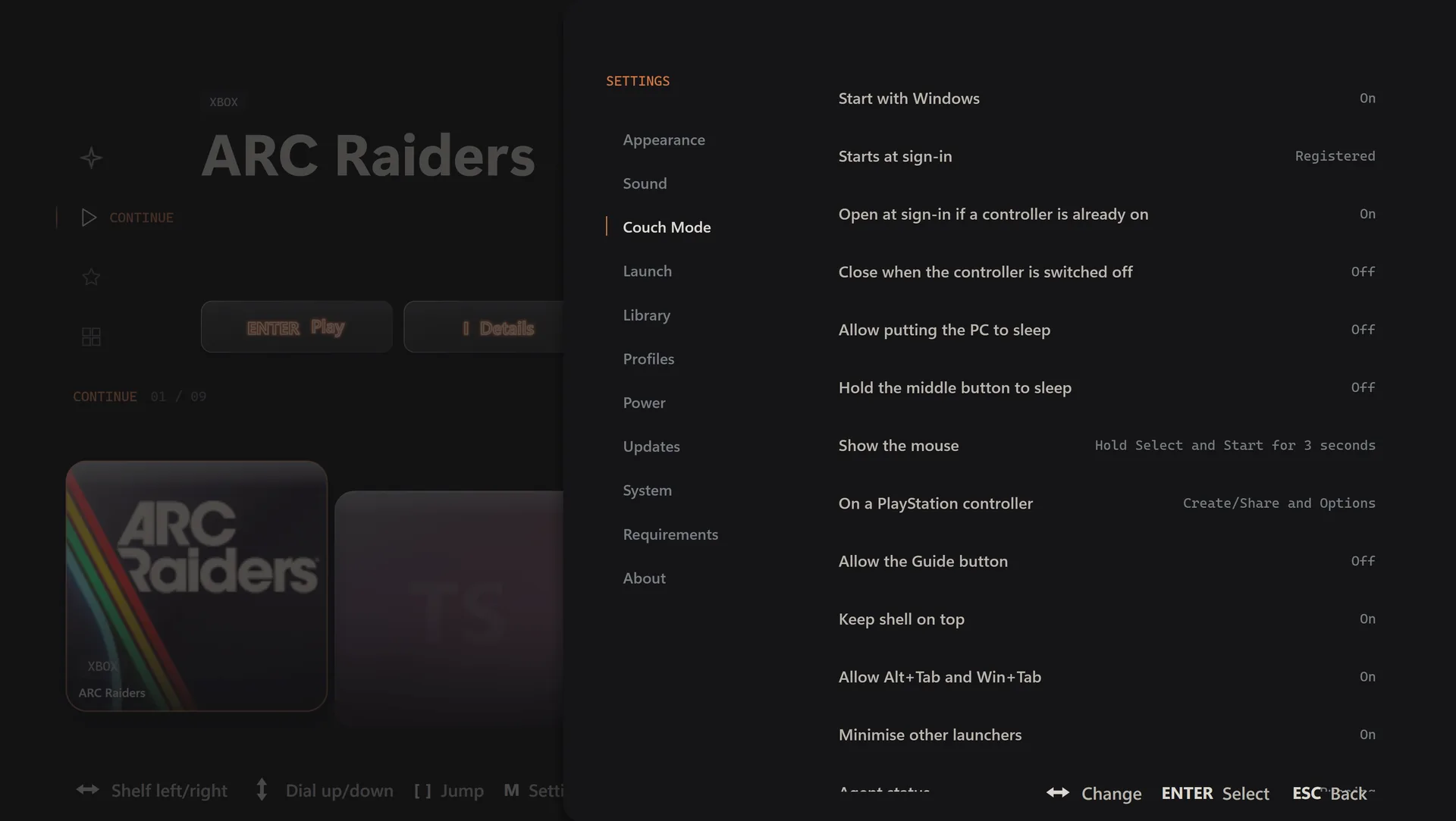
Onyro Couch Mode settings: start with Windows, open when a controller is on, show the mouse with Select and Start.
Couch Mode settings, all in plain words.

Xbox and PlayStation, out of the box

Controllers and power

Your controller

Xbox controllers, PlayStation DualSense and DualShock 4 over USB or Bluetooth, and controllers with an XInput mode, such as many 8BitDo, GameSir, Flydigi and PowerA models. Button prompts switch to match the controller in your hand. Keyboard and mouse work too.

Power from the controller

Exit, restart or shut down with a confirmation each time. Optional: sleep the PC, or shut it down when you switch the controller off.

Bluetooth controllers off

When Onyro closes, it switches Bluetooth controllers off so nothing stays on. Wired and dongle controllers are left alone.

Inside your games

Once a game starts, the game decides which controllers it accepts. Onyro starts each game through its own launcher, so Steam Input keeps working for Steam games.

Free. Private. Light.

Nothing to sign up for

Free

No paid tier and no locked features. Donations are optional and change nothing.

Private

No account, no sign-in, no ads. Your library stays on this PC. The only request Onyro makes on its own is an update check that sends the Onyro and Windows version numbers.

Light at rest

Near-zero CPU while Onyro waits on the shelf, and it steps aside while you play. Updates install through Microsoft Store.

Honest comparison

How Onyro compares

Steam Big Picture

Brilliant for Steam games, with Steam Input for almost any controller. Games from other stores need manual shortcuts. Onyro finds them all on its own.

Onyro vs Big Picture

Xbox mode

Microsoft's full-screen mode for Windows 11, with the Game Pass catalogue built in. Onyro gives you a couch shelf on Windows 10 (21H2 or later) as well as Windows 11.

Xbox mode on Windows 10

Playnite

Free, open source and endlessly customisable, but each store needs setting up first. Onyro has nothing to set up.

Full comparison

Questions

Questions people ask

What is Onyro?

Onyro is a free, couch-first game launcher for Windows 10 and 11. It finds the games already installed by Steam, the Xbox app, Epic Games, GOG, EA app, Ubisoft Connect, Battle.net, Rockstar Games Launcher, Riot Client and itch.io, and puts them on one full-screen shelf you drive with a controller.

Is Onyro free?

Yes. Onyro has no paid tier and no locked features. You can donate if you want to, and donating changes nothing in the app.

Which controllers work with Onyro?

Xbox controllers, PlayStation DualSense and DualShock 4 over USB or Bluetooth, and controllers with an XInput mode, such as many 8BitDo, GameSir, Flydigi and PowerA models. Keyboard and mouse work too. Inside a game, the game decides which controllers it accepts.

Can I use my controller as a mouse?

Yes. Hold Select and Start for three seconds (Create and Options on a PlayStation controller) and the right stick moves the Windows pointer. A or the right trigger clicks and the left trigger right-clicks. Hold both again to hide it.

Can Onyro turn my PC off from the sofa?

Yes. Select opens Power options: exit Onyro, restart or shut down the PC, and each one asks first. You can also turn on sleep, or have the PC shut down when you switch the controller off.

Does Onyro open when I turn on my controller?

Yes, if you pick the start-up helper on first launch. Once Windows is signed in, switching on a controller opens Onyro or brings it to the front. It can't wake a PC that is asleep or switched off.

Does Onyro work on Windows 10?

Yes. Onyro runs on 64-bit Windows 10 version 21H2 or later and on Windows 11.

Is Onyro an alternative to Steam Big Picture, Playnite or Xbox mode?

It covers the same couch idea with a different focus: every launcher with no setup, a built-in controller mouse and power from the sofa. The full comparison shows where each one is the better pick.

Does Onyro sell or download games?

No. Onyro lists and launches games you already have, through the launchers you already use. It does not sell, supply or modify games.

Does Onyro collect my data?

No account, no sign-in, no ads. Your library stays on this PC. The only request Onyro makes on its own is an update check that sends the Onyro and Windows version numbers and nothing about your games.

Where do I download Onyro?

From the Microsoft Store. Updates arrive through the Microsoft Store as well.

Your PC games, from the sofa.

Free on Microsoft Store. No account, no paid tier.

Get Onyro from Microsoft Store